


KSL.com News Utah
3.81.31K Reviews
App Specs
- Version
- 2.41.0
- Updated On
- License
- Free
- Downloads
- 500,000+
- Developer
- Deseret Digital Media
- Categories
- News & Magazines
- Platform
- Android, iOS
Screenshots
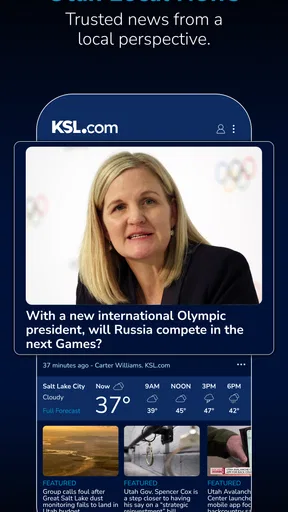
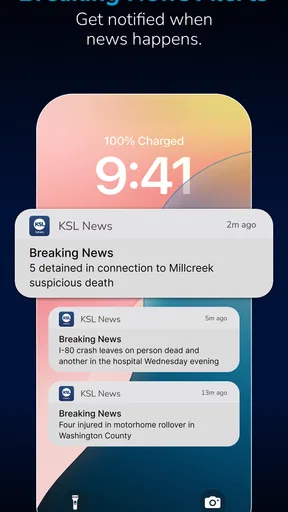
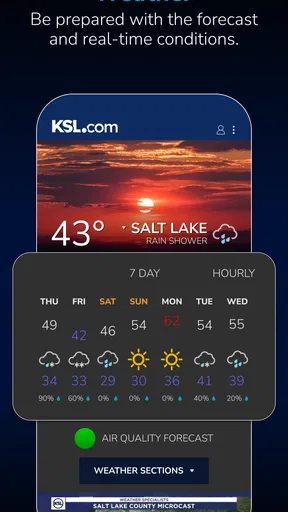
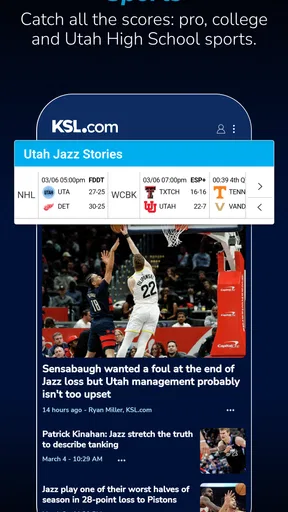


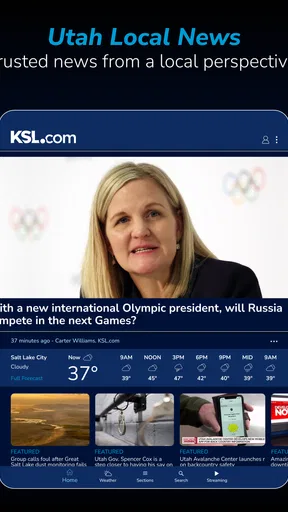
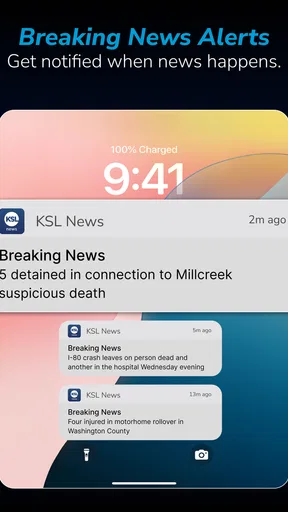
 Analysis by AppCompare
I use KSL.com News as a quick way to keep up with Utah stories when I do not want to sort through a national news feed first. It is a free news and magazines app from Deseret Digital Media, aimed squarely at local coverage rather than trying to be an all-purpose source for everything happening in the world. That focus is its biggest strength, but it also explains why it will feel less useful to readers who want broad international reporting or a single app for every region.
My overall impression is that this is most valuable as a practical daily check-in. It can fit into a morning routine, a commute, or a short break when I want to know what is happening around Utah. The app has been available since late 2011, and its current version is 2.41.0. It supports Android 8.0 and later, carries an Everyone age rating, and has built a substantial audience with more than 500 thousand installs. Those details make it approachable for many Android users, although the age of the platform also means I would not expect every part of the experience to feel as fresh as a brand-new news product.
How the Utah focus changes the reading experience
The first thing I notice is how different a local-first news app feels from a large national aggregator. Instead of beginning with an endless mix of celebrity, technology, politics, and international headlines, KSL.com News gives me a more geographically relevant starting point. If I live in Utah, work there, travel through the state, or have family there, that narrower lens can save time. I am not constantly filtering out stories that have no practical connection to my day.
That focus is also useful when a story is developing quickly. Local events often matter because of where they happen, how they affect nearby communities, and what changes for people on the ground. A Utah-centered source is more likely to be the app I open when I want local context rather than a national summary that treats the state as a small part of a much larger story.
At the same time, I would not use it as my only source of news. A local app naturally has a narrower editorial range than a broad newspaper app, wire-service reader, or general news aggregator. If my main interest is international affairs, national business coverage, or a wide selection of opinion writing, I would pair this app with something else. Its value comes from concentration, not completeness.
The store rating sits at about 3.8 from roughly 3.6 thousand ratings, with around 1.3 thousand written reviews. I read that as a sign of a useful but not universally smooth experience: enough people find it worthwhile to keep using, while the score leaves room for interface friction, changing expectations, or differences in what readers want from a local news app. I would treat the rating as a starting point, not a substitute for deciding whether Utah coverage is relevant to me.
When a connection is part of the experience
News apps are especially dependent on timely network access, and that is noticeable here. The app makes the most sense when I have a reliable connection and want current information. Opening it before leaving home, checking it during a break on a known Wi-Fi network, or using it with a stable mobile signal gives the experience its intended rhythm: open the app, review what has changed, and follow the stories that matter.
Worth Reading Before You Choose

EA SPORTS FC Mobile 26 Is a Bigger Football Game, but It Takes Time

Flipboard Shows What News Apps Must Do Beyond the Feed

Switching to Android Auto Means Rethinking Your Driving Routine

Google Calendar Makes a Crowded Week Easier to Manage

Ludo King Makes the Most of the Minutes Between Plans

Baby Panda World Brings Quick Play to Modern Phones, but Its Game Library Feels Busy
That dependence becomes more obvious in places where the signal is weak. A local news app can be very useful while I am planning a drive or checking a developing situation, but those are also moments when connectivity may be inconsistent. I would not assume that every article, image, or update will be available if the network disappears. Instead, I treat the app as a connected reading tool and make important decisions with that limitation in mind.
One practical habit helps: I check the app before entering a tunnel, heading into a rural area, or starting a trip where coverage may change. That gives me a chance to read the key details while the connection is good instead of waiting until I need them. It is a small workflow, but it prevents me from confusing a news app with a guaranteed emergency information channel.
The same principle applies to breaking news. If a headline is changing quickly, I refresh only when I have a dependable connection and allow time for the page to load. Repeatedly tapping refresh in a weak-signal area does not make information arrive faster; it only makes the experience feel unreliable. I prefer to wait for a stronger connection, then check the story once and read the available context carefully.
Using it in ordinary mobile situations
KSL.com News works best in short sessions. I can imagine opening it with breakfast, scanning local headlines before work, then returning later when something relevant develops. That is a better fit than expecting a long magazine-style reading session every time. The Utah emphasis makes the app suitable for quick awareness: I can see whether there is a local story worth following without committing to a large, mixed feed.
It also suits people who have moved away from Utah but still care about what happens there. Former residents, students, relatives, and frequent visitors may appreciate having a familiar regional source in a phone-sized format. In that situation, the app is less about discovering random content and more about maintaining a connection with a place.
My most realistic use case would be a weekday morning. I would open the app on Wi-Fi, skim the main local headlines, read one or two stories that could affect my plans, and close it rather than leaving it running as background noise. Later, if I heard about an event in the state, I would return to look for local reporting instead of relying only on a social media post. That approach keeps the app useful without turning every notification or headline into a reason to interrupt the day.
I also like the idea of using it as a second check after seeing a local claim elsewhere. Social feeds can surface information quickly, but they often strip away location and context. A Utah-focused news app gives me a more sensible place to investigate whether a story is relevant to the community I care about. It does not remove the need for judgment, but it can make the first verification step more focused.
There is a trade-off on smaller screens. Local news is easier to scan than a broad feed because the subject area is more limited, but reading several detailed stories on a phone can still become tiring. I would use the app for discovery and short reading sessions, then move to a larger screen if I wanted to spend a long time comparing details or following a complicated story.
What happens when loading goes wrong
Connectivity problems are not just technical annoyances in a news app; they affect whether the product feels current. If a page loads slowly, an image is delayed, or a refresh does not immediately show a change, I may wonder whether the story itself is old or whether the connection is simply struggling. That uncertainty is one of the main weaknesses of relying on a mobile news feed.
My advice is to separate three situations: a slow first load, a failed refresh, and an article that opens but does not display completely. For the first, I wait briefly rather than tapping repeatedly. For the second, I check whether other apps can reach the internet before blaming the news app. For the third, I return to the main feed and try the story again when the signal is stronger. This simple process avoids wasting time and helps identify whether the problem is temporary network congestion.
I would also avoid depending on the app as the sole way to receive urgent information. If I am dealing with a safety issue, travel disruption, or time-sensitive local event, I want more than one reliable channel. The app can help me understand a story, but a connection failure, delayed update, or unavailable page could leave a gap at exactly the wrong moment. That is not a criticism unique to this product; it is a basic limitation of connected news reading.
Another recovery habit is to remember what I actually needed from the article. If I opened a story for a location, a schedule, or a practical detail, I try to read that part before browsing further. When the connection becomes unstable, I would rather secure the essential information than keep attempting to load every related item. This makes the app more useful in real mobile conditions than treating it like an unlimited desktop feed.
Keeping mobile data under control
Because news feeds can include images and frequently changing content, I use this kind of app more deliberately when I am on mobile data. I start with headlines and open only the stories that matter to me. That is more efficient than loading every item in a long session, especially when I am traveling or have a limited data allowance.
A good routine is to do the broad scan on Wi-Fi and reserve cellular access for individual articles. I also avoid refreshing simply because I have returned to the app after a few minutes. A refresh is worthwhile when I expect a meaningful update, not as a nervous habit. This is one of the less obvious trade-offs of a local news service: the more current I want the feed to be, the more often I may be asking the phone to retrieve new content.
I would not judge the app only by how quickly it presents a headline. The useful question is whether the article gives enough local context to justify opening it. If I am checking a story that directly affects my neighborhood, commute, or family, the additional data use may be worthwhile. If I am casually browsing without a specific interest, a brief headline scan is the more sensible choice.
Readers who are particularly careful with data should make the app part of a broader phone routine rather than leaving it as an automatic background check. I would review its behavior in the device’s own data controls and use the app when I choose, especially while traveling outside my usual network. That advice is practical rather than a claim about a particular setting: the exact controls depend on the Android device and system configuration.
Who should install it, and who should choose something else?
I recommend KSL.com News to people who want Utah news to be the center of their daily reading. It is a sensible choice for residents, people with close ties to the state, and anyone who values local relevance over a huge collection of unrelated headlines. The free price removes the usual trial barrier, and the Everyone rating makes it broadly approachable for families looking for a general local news source.
I would be more cautious if I lived outside Utah and had no particular connection to the state. In that case, a regional app for my own area would probably be more useful. I would also look elsewhere if I wanted a deep international news service, extensive financial reporting, or a highly customizable multi-source reader. The app’s narrow purpose is a benefit only when that purpose matches my needs.
It is worth considering the Android requirement as well. The app needs Android 8.0 or later, so users with older phones may need to upgrade their device or use another way to follow local news. For supported phones, the current version is 2.41.0, which is the version I would look for when deciding whether my installation is up to date.
Compared with social media, this app offers a more focused path into Utah coverage and less dependence on whatever happens to appear in a personal feed. Compared with a national news app, it gives up breadth in exchange for local attention. Compared with reading a newspaper website in a browser, the dedicated app is more convenient for repeated phone check-ins, while the browser may be preferable when I want to compare several sources or avoid adding another app.
My connectivity verdict
After using it as a local news companion, I see KSL.com News as a focused tool rather than a complete news universe. Its strongest quality is the way it keeps Utah stories close at hand, especially during short mobile sessions when I want local relevance without sorting through national noise. The main limitation is equally clear: the experience depends on a working connection, and the narrow regional focus will not satisfy everyone.
I would install it if Utah news is part of my everyday life, then build a simple habit around it: check on a reliable connection, read the stories that affect me, avoid unnecessary refreshing on cellular data, and keep another source available for urgent situations or broader coverage. That approach plays to the app’s strengths without asking it to do a job it was not designed to do.
My final recommendation is positive for Utah-focused readers, but conditional for everyone else. Deseret Digital Media has created a straightforward local news option that is easy to understand: use it when you want a convenient view of what is happening in Utah. If that is the question I am asking, the app earns a place on my phone. If I need worldwide breadth, extensive customization, or dependable access away from a network, I would choose a different companion rather than forcing this one to cover those gaps.
Pros
- Fast access to Utah news
- weather
- sports
- and local updates.
- Useful alerts help you stay informed about breaking regional stories.
- Sports coverage includes detailed updates on local teams and events.
- Classifieds and community features add value beyond standard news.
- Clean layout makes articles easy to browse on a mobile device.
Cons
- Coverage is mainly Utah-focused and may feel limited for national news.
- Frequent notifications can become distracting without careful settings.
- Some content may require a reliable internet connection to load properly.
- Advertising can interrupt browsing and reduce the reading experience.
- The app may collect usage and device data for personalization and analytics.
FAQs for KSL.com News Utah
What is KSL.com News Utah?
KSL.com News Utah is a news and information app focused on Utah and the surrounding region. It provides access to local breaking news, weather updates, traffic information, sports coverage, community stories, and other content from KSL. The app is designed for readers who want a convenient way to follow important developments in Utah from an Android or iOS device.
What type of content can I read in the KSL.com News Utah app?
The app covers a broad selection of topics, including Utah politics, crime, education, business, health, technology, entertainment, and local events. It also commonly includes dedicated sections for Utah sports, weather forecasts, traffic conditions, and regional news. Available stories and categories may change throughout the day as new reports are published.
Does KSL.com News Utah provide breaking news notifications?
Yes, the app may send push notifications about breaking news, major weather events, traffic disruptions, sports developments, and other important updates. Notifications can be useful for staying informed without constantly opening the app, although frequent alerts may not suit everyone. After installation, users can usually manage notification permissions and preferences through the device settings or app options.
Is KSL.com News Utah free to download and use?
KSL.com News Utah is generally available as a free download, allowing users to browse news and other public content without purchasing the application. However, internet access is required, and mobile data charges may apply when using cellular networks. Some content, services, advertising arrangements, or features could change over time, so users should review the current store listing and app policies before downloading.
Does the app require an account or share my personal information?
Many news articles can typically be viewed without creating an account, making it possible to explore the app immediately after installation. Certain features, such as personalized settings, saved content, comments, or other interactive services, may require registration. Before using those features, review the app’s privacy policy and permission requests to understand what information may be collected, stored, or shared.


